
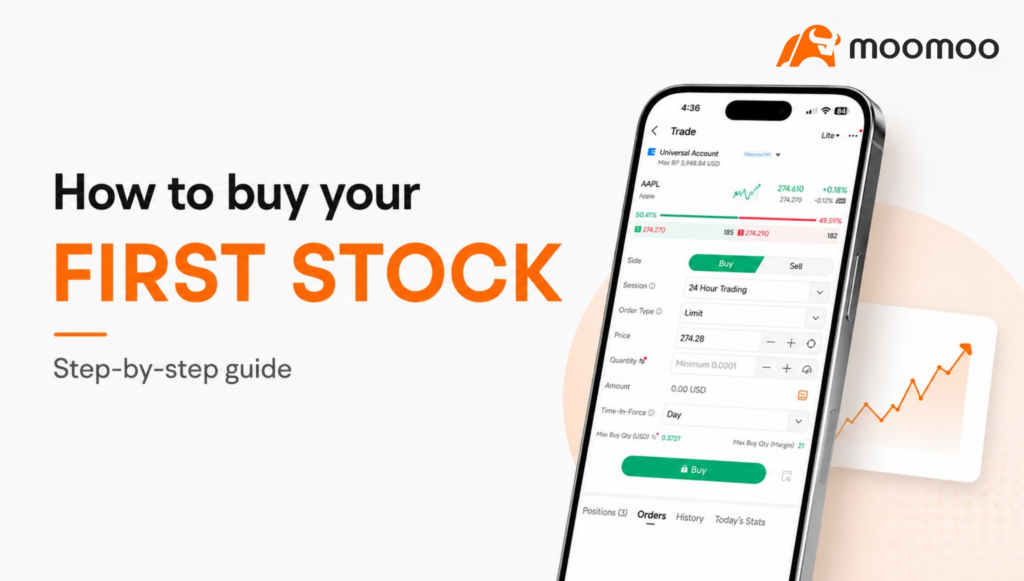
Estimated reading time: 16 minutes
Buying your first stock can feel scary.
You open the app or trading platform, see so many buttons, stock prices moving up and down, words like “limit order”, “bid”, “ask”, “settlement”, “time-in-force”… and suddenly it feels like you need a finance degree just to buy one share.
But don’t worry, once you break it down, buying a stock is actually quite straightforward.
You just need to understand what you are buying, how much you are buying, what price you are paying, and when the trade is completed.
So in this article, let’s go through the basics step by step.
TABLE OF CONTENTS
- What Is a Stock?
- What Is Shareholding?
- Step 1: Deposit Money Into Your Brokerage Account
- Step 2: Search for the Stock You Want to Buy
- Step 3: Understand Trading Sessions
- Step 4: Understand Share Price
- Step 5: How Does Share Price Move?
- Step 6: Choose Your Order Type
- What About Stop Loss?
- Step 7: Decide Your Quantity
- Step 8: Choose Time-in-Force
- Which Stock Should You Start With?
- Step 9: How to Withdraw Money
- Step 10: Understand Settlement
- A Simple First-Stock Checklist
- Trading fees (Moomoo Malaysia)
- Sign Up Now to Make Your First Trade (Limited time exclusive rewards!)
- Final Thoughts
What Is a Stock?
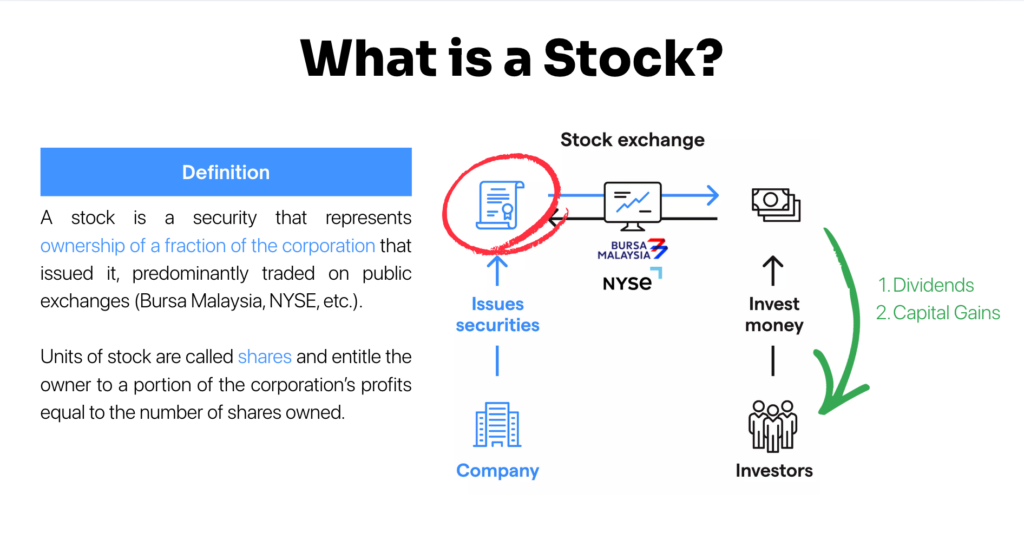
A stock, such as a Malaysia stock or US stock, is basically a small ownership stake in a company.
When a company becomes publicly listed, investors can buy and sell its shares on a stock exchange, such as Bursa Malaysia, the New York Stock Exchange, or Nasdaq.
So when you buy a stock, you are not just buying a random price chart.
You are buying a small piece of a real business.
For example, if you buy Apple shares, you own a tiny part of Apple. If you buy Maybank shares, you own a tiny part of Maybank.
There are generally two ways investors make money from stocks:
- Capital gain: when the stock price goes up and you sell at a higher price.
- Dividend: when the company distributes part of its profits to shareholders.
Of course, stock prices can also go down. So before you buy anything, you need to understand both the upside and the risk.
What Is Shareholding?
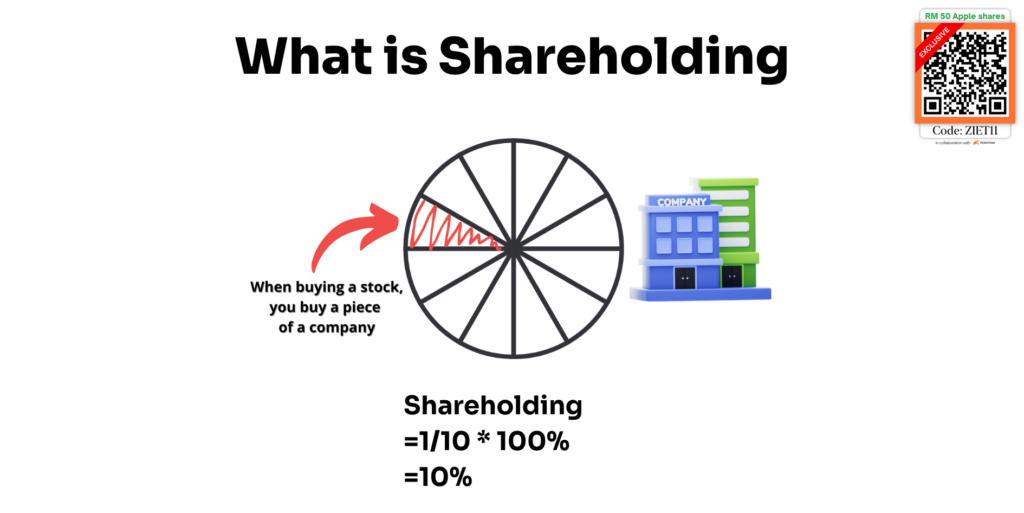
Shareholding simply means how much of a company you own.
Imagine a company is divided into 10 equal pieces. If you buy 1 piece, you own 1 out of 10 pieces.
That means your shareholding is: 1 / 10 × 100% = 10%
In the real stock market, companies are divided into millions or even billions of shares. So for retail investors like us, our ownership percentage is usually very small.
But the idea is the same.
When you buy shares, you become a shareholder. You own a tiny slice of the business, and your investment value moves together with how the market values that business.
Step 1: Deposit Money Into Your Brokerage Account
Before you can buy your first stock, you need to deposit money into your brokerage account.
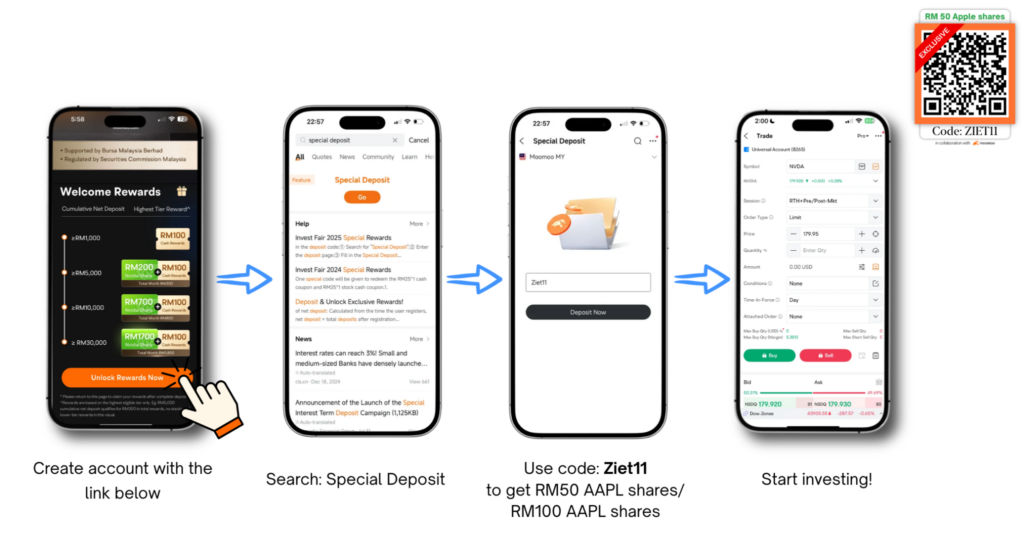
The deposit process usually looks something like this:
- Create an account first.
- Search ‘Special Deposit’.
- Key in code ‘ZIET11’.
- Click ‘Deposit Now’.
- Select FPX Express Deposit (my usual go-to among other methods)
- Choose your bank.
- Fill in the amount you want to deposit.
- Confirm the transfer.
One important reminder: only deposit money that you are ready to invest. Don’t use emergency savings, rent money, or money you need in the short term.
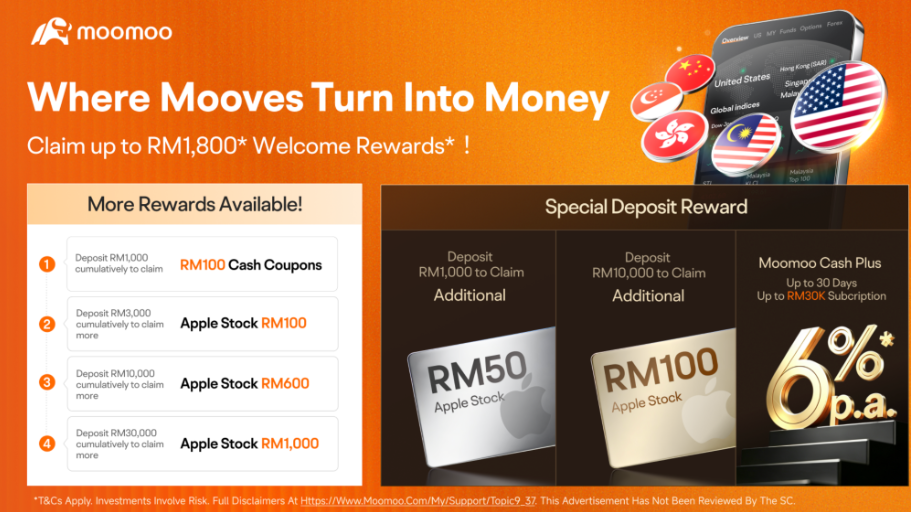
Investing should help you build wealth, not create unnecessary financial stress.If you don’t have a broker account yet, here’s some good news for you. For a very limited time, new users will get up to RM1,900 worth of welcome rewards when you sign up. So feel free to use my exclusive code ‘ZIET11’ to unlock all the new users’ rewards!
Step 2: Search for the Stock You Want to Buy
Once your money is inside your brokerage account, you can start searching for the stock.
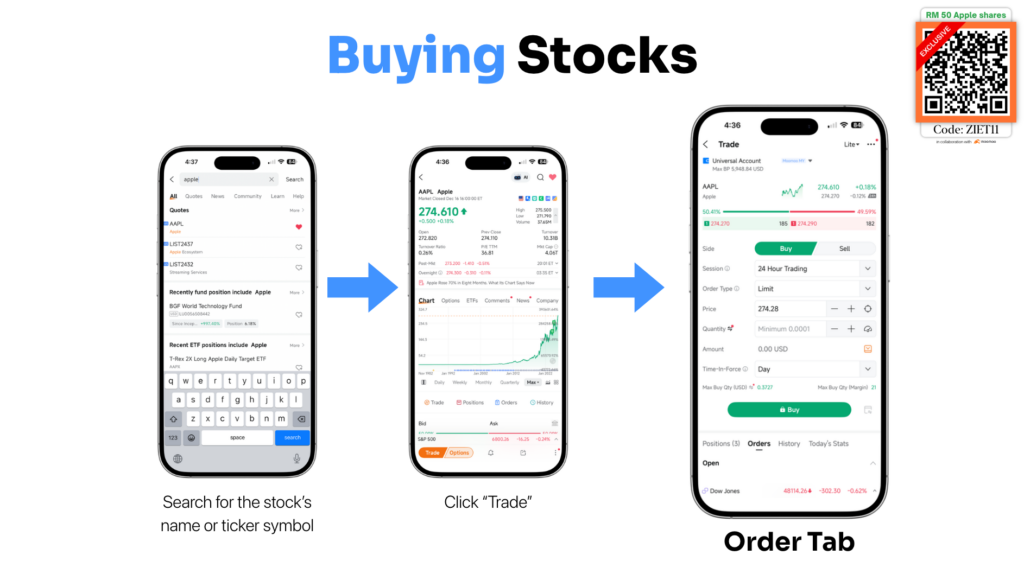
You can usually search by:
- Company name, for example “Apple” or “Maybank”
- Ticker symbol, for example “AAPL” or “MAYBANK”
After you find the stock, click into it, then tap Trade or Buy.
This will bring you to the order page. And this is where many beginners get confused.
Because suddenly you’ll see things like:
- Session
- Price
- Order type
- Quantity
- Time-in-force
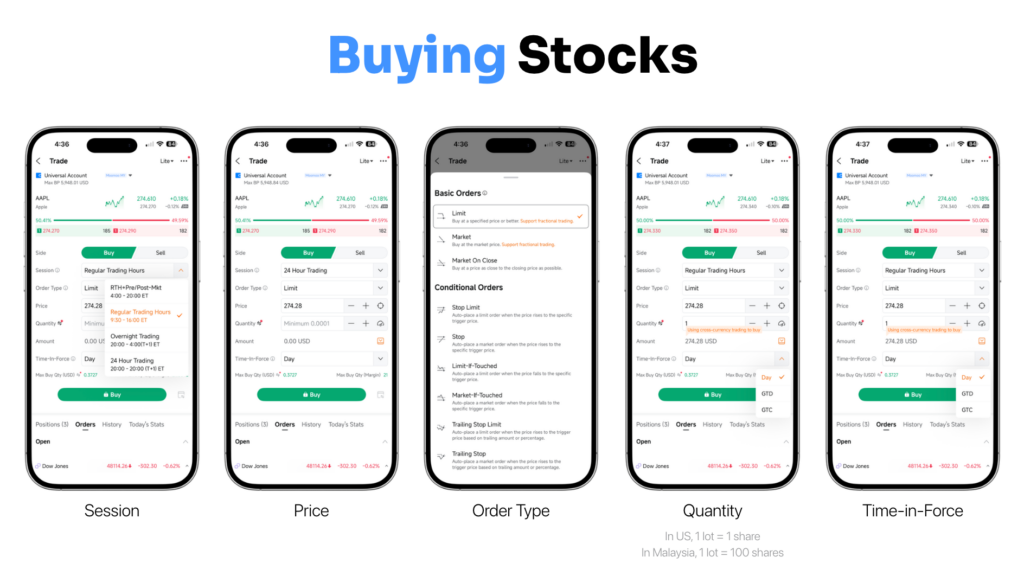
Let’s go through them one by one.
Step 3: Understand Trading Sessions
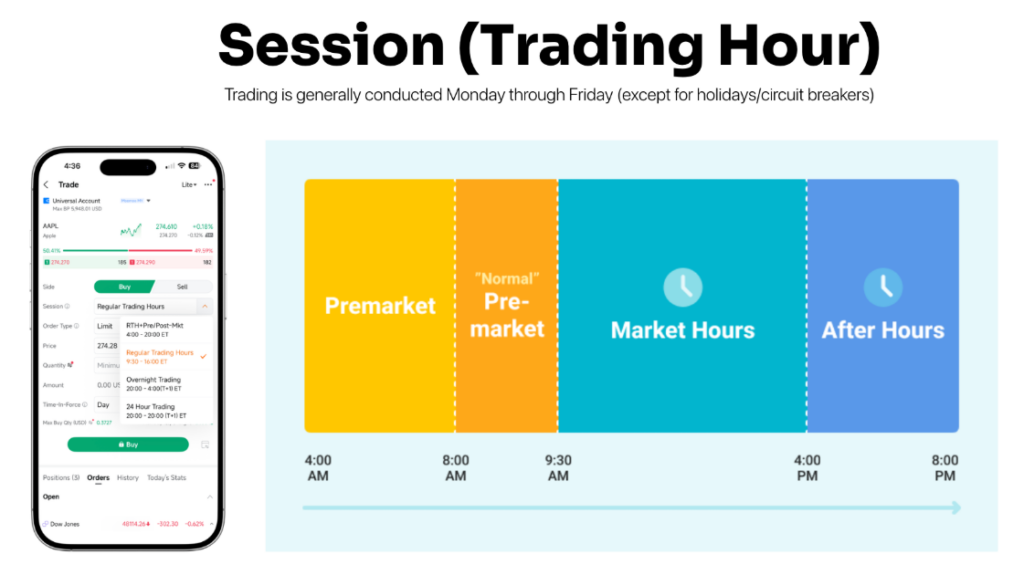
A trading session refers to when the stock market is open for buying and selling.
Generally, stock markets operate from Monday to Friday, excluding public holidays or special market closures.
For the US market, you may also see different sessions like:
- Pre-market
- Regular market hours
- After-hours trading
For beginners, it is usually easier to trade during normal market hours because there tends to be more volume and tighter spreads.
In simple terms: more buyers, more sellers, and usually fairer pricing.
So if you’re buying your first stock, don’t overcomplicate it. Start with regular trading hours.
Step 4: Understand Share Price
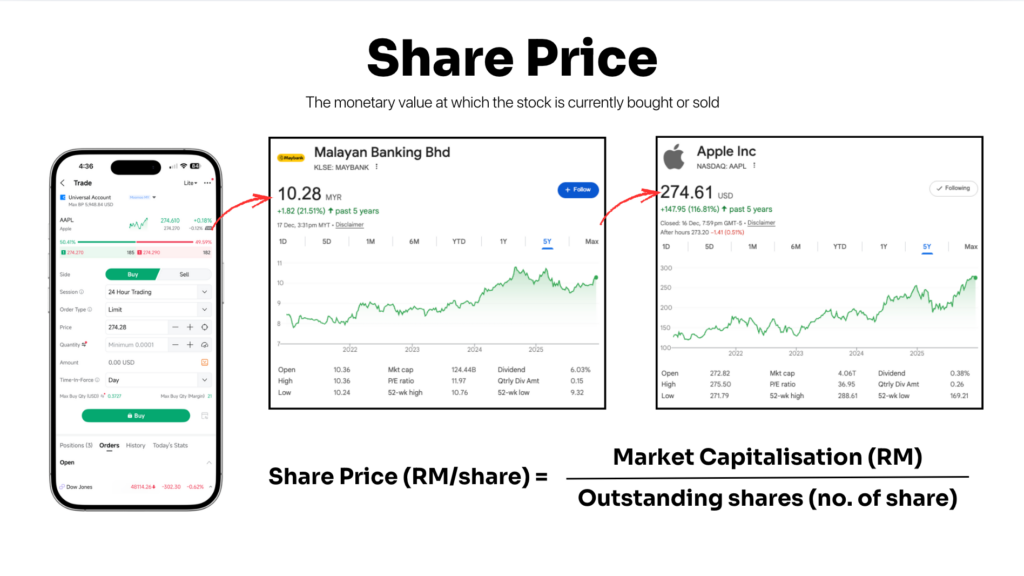
The share price is the price at which a stock is currently being bought or sold.
But here’s something many beginners misunderstand:
A stock is not automatically “cheap” just because its price is low.
For example, a RM1 stock is not necessarily cheaper than a RM100 stock.
Because share price depends on how many shares the company has.
The basic formula is: Share Price = Market Capitalisation / Outstanding Shares
So instead of only looking at share price, investors usually look at the overall value of the company, its earnings, growth, business quality, and valuation.
A stock price tells you what the market is currently willing to pay. It does not automatically tell you whether the company is good or bad.
Step 5: How Does Share Price Move?
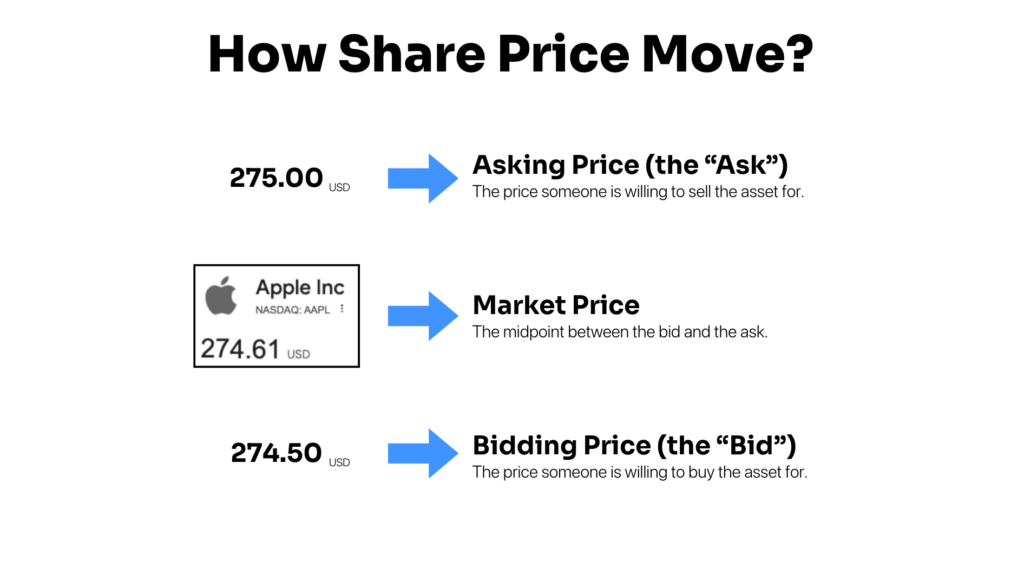
Stock prices move because of buyers and sellers. There are three important terms to understand:
Bid Price
The bid price is the price someone is willing to buy the stock for.
For example, if someone is willing to buy Apple at USD274.50, that is the bid.
Ask Price
The ask price is the price someone is willing to sell the stock for.
For example, if someone wants to sell Apple at USD275.00, that is the ask.
Market Price
The market price is usually the latest traded price or the price shown around the midpoint between buyers and sellers.
The gap between the bid and ask is called the spread.
Usually, when more buyers are willing to pay higher prices, the stock price moves up. When more sellers are willing to sell at lower prices, the stock price moves down.
That’s the basic mechanism. Something like supply and demand.
Step 6: Choose Your Order Type
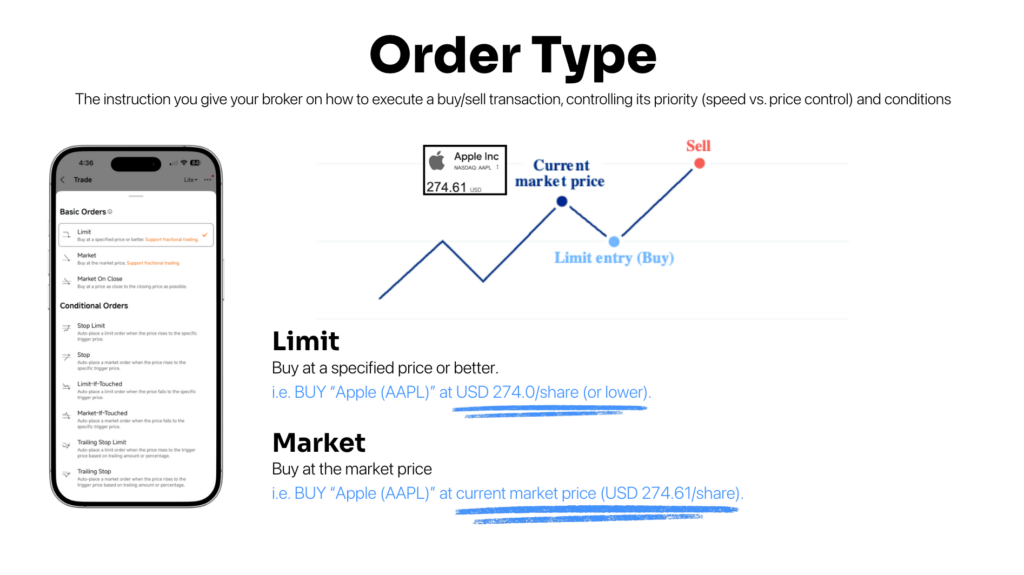
An order type is the instruction you give your broker on how to execute your trade.
The two most common order types beginners should understand are:
Market Order
A market order means you buy immediately at the current market price.
For example:
Buy Apple at the current market price of around USD274.61.
The advantage is speed. Your order is more likely to be executed quickly.
The downside is that you have less control over the final price, especially if the stock is moving fast.
Limit Order
A limit order means you choose the maximum price you are willing to pay.
For example:
Buy Apple only at USD274.00 or lower.
The advantage is price control. You won’t accidentally buy at a much higher price than expected.
The downside is that your order may not be executed if the market price never reaches your limit price.
For beginners, limit orders are usually easier to control because you know the exact price you are willing to accept.
What About Stop Loss?
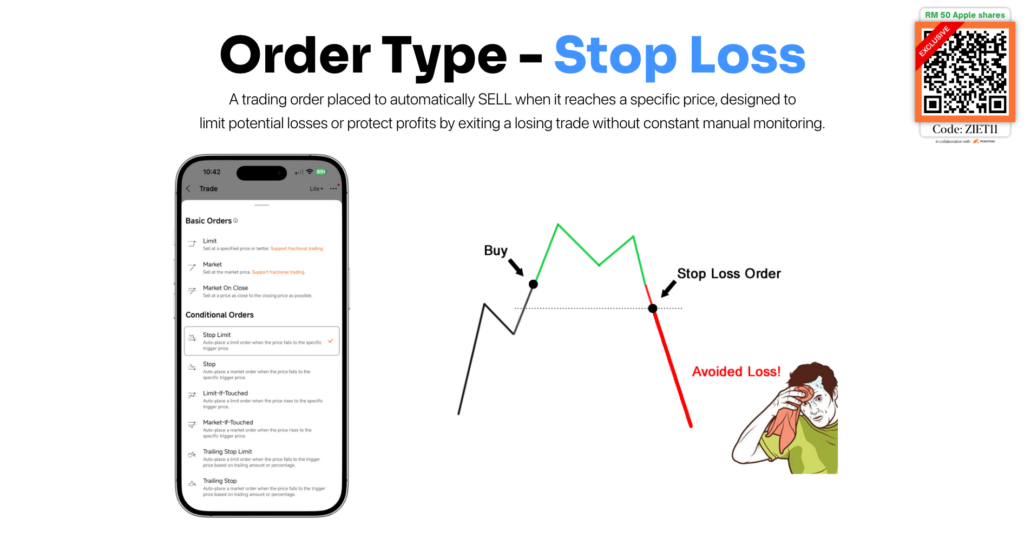
A stop-loss order is an instruction to automatically sell a stock when it falls to a specific price.
It is mainly used to limit potential losses or protect profits without needing to monitor the market all day.
For example, if you bought a stock at RM10, you may set a stop loss at RM9. If the price falls to RM9, your broker will trigger the sell order.
Here’s some tips to decide your risk before buying:
- How much are you willing to lose?
- How much of your portfolio should one stock take up?
- Are you buying for short-term trading or long-term investing?
Step 7: Decide Your Quantity
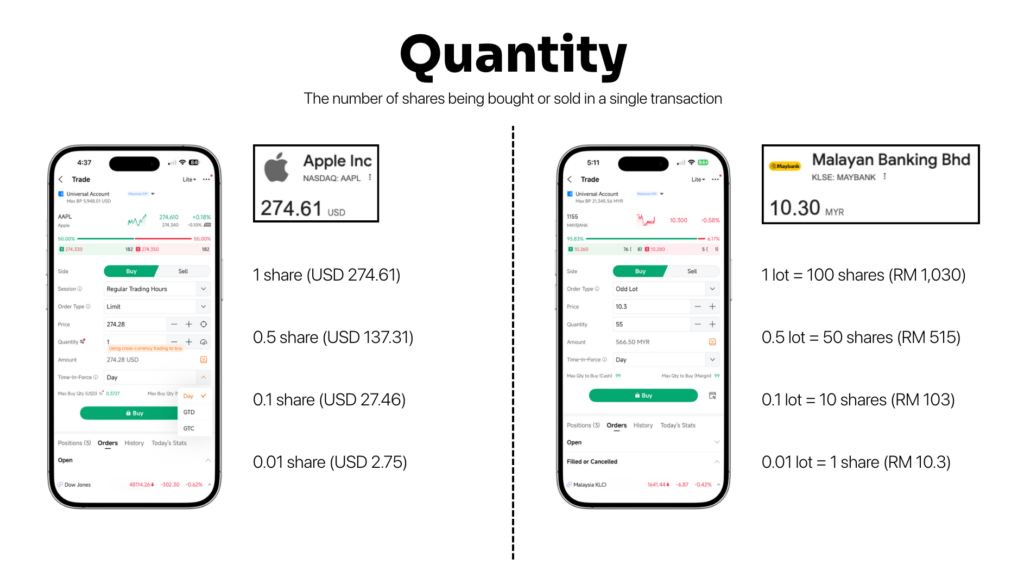
Quantity means how many shares you want to buy.
For US stocks, many platforms allow you to buy whole shares or even fractional shares.
For example, if Apple is trading at USD274.61:
- 1 share = USD274.61
- 0.5 share = USD137.31
- 0.1 share = USD27.46
- 0.01 share = USD2.75
This is useful for beginners because you don’t need a huge amount of capital to start.
For Malaysia stocks, it usually works by lots.
In Malaysia: 1 lot = 100 shares
So if Maybank is trading at RM10.30:
- 1 lot = 100 shares = RM1,030
- 0.5 lot = 50 shares = RM515
- 0.1 lot = 10 shares = RM103
- 0.01 lot = 1 share = RM10.30
Depending on the broker and market, the minimum tradable quantity may differ. So always check the app before placing your order.
The simple formula is: Total Cost = Share Price × Number of Shares + Fees
Step 8: Choose Time-in-Force
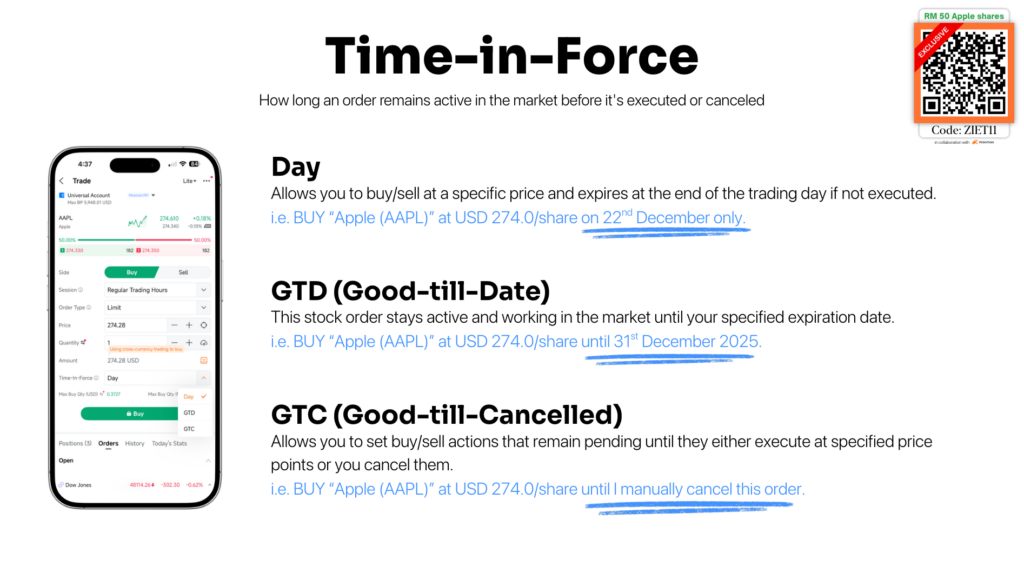
Time-in-force tells your broker how long your order should stay active.
There are three common types:
Day Order
A day order only lasts for that trading day.
If the order is not executed by the end of the day, it expires automatically.
Example:
Buy Apple at USD274.00 today only.
GTD — Good-Till-Date
A GTD order stays active until the date you choose.
Example:
Buy Apple at USD274.00 until 31 December 2025.
If the price reaches your target before that date, the order may execute. If not, it expires.
GTC — Good-Till-Cancelled
A GTC order stays active until it is executed or until you manually cancel it.
Example:
Buy Apple at USD274.00 until I cancel this order.
This is useful if you have a long-term target price, but you should still monitor your open orders.
You don’t want to forget an order exists and accidentally buy something weeks later without remembering why.
Which Stock Should You Start With?
For beginners, one common question is:
Should I buy individual stocks or ETFs?
An individual stock gives you exposure to one company.
For example, buying Nvidia means your return depends heavily on Nvidia’s business performance, investor expectations, and share price movement.
The upside can be higher, but the risk is also more concentrated.
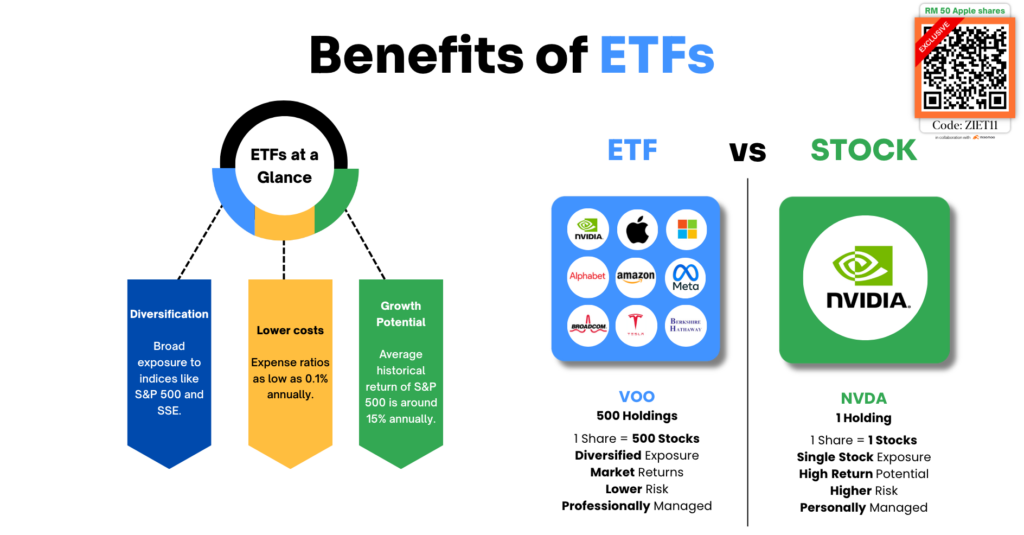
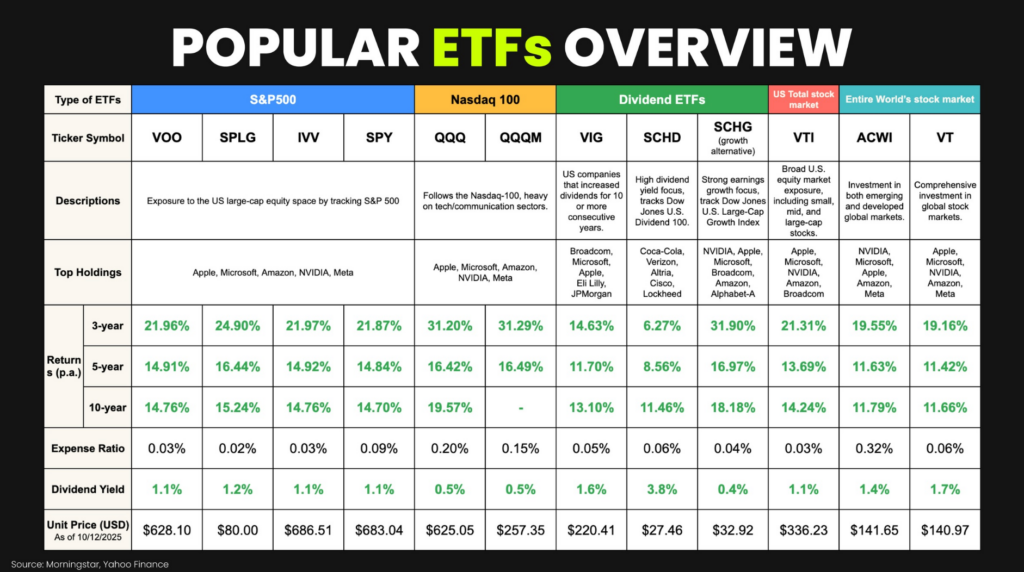
An ETF, on the other hand, gives you exposure to a basket of stocks.
For example, an S&P 500 ETF like VOO gives investors exposure to around 500 large US companies. Instead of betting on one company, you are buying a basket of companies.
That means:
- More diversification
- Lower single-company risk
- Lower cost compared to many actively managed funds
- Easier for beginners to understand
This does not mean ETFs are risk-free. They can still go down when the market falls.
But compared to picking one company, ETFs are often a cleaner starting point for beginners who want broad market exposure without analysing every single stock.
Step 9: How to Withdraw Money
At some point, you may want to withdraw your cash.
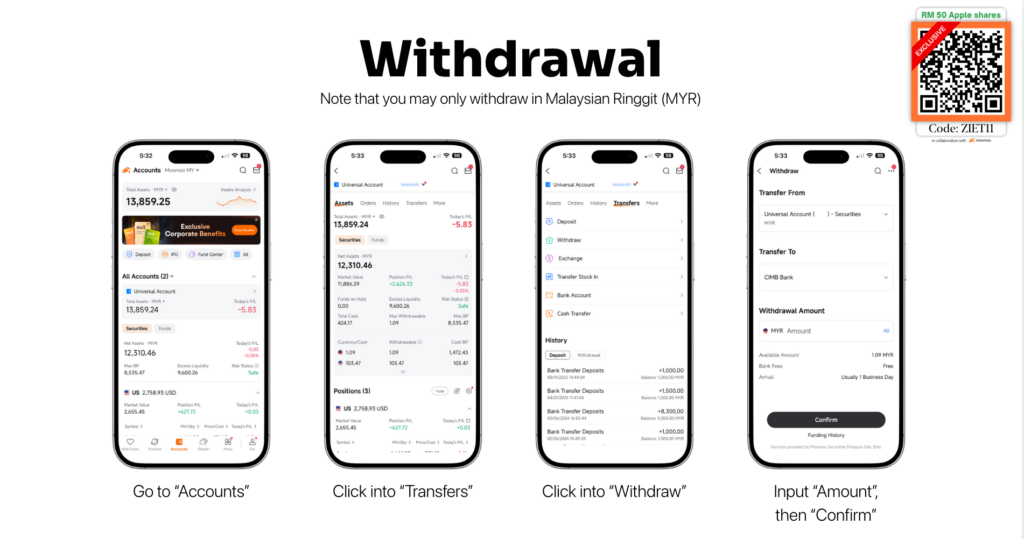
The withdrawal process is usually:
- Go to Accounts.
- Click Transfers.
- Click Withdraw.
- Input the amount.
- Confirm.
Also, if your money is currently invested in stocks, you cannot withdraw it immediately. You need to sell the stock first, then wait for settlement.
Which brings us to the next important point.
Step 10: Understand Settlement
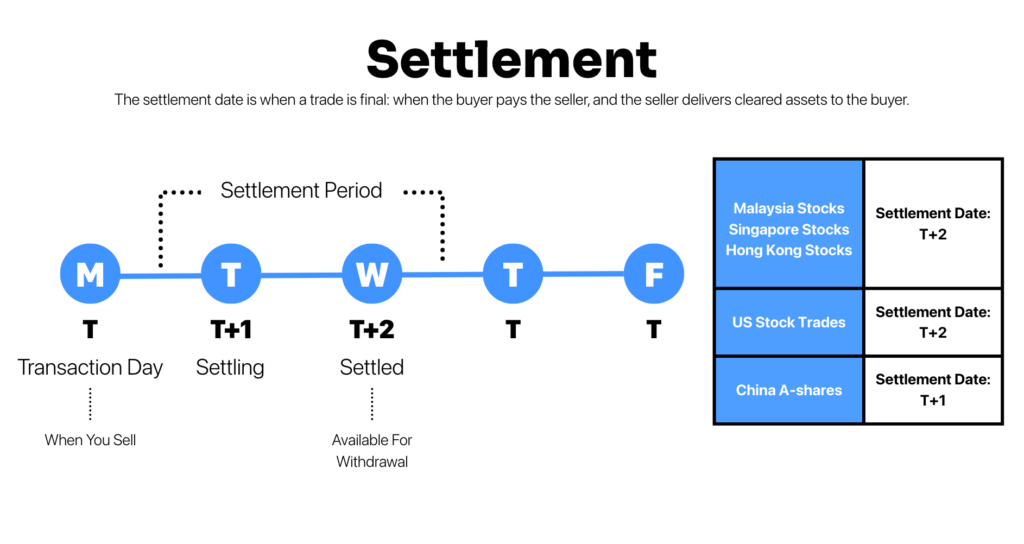
Settlement is when a trade is officially completed.
It is the point where:
- The buyer pays the seller
- The seller delivers the shares
- The cash becomes cleared
This matters because when you sell a stock, the cash may appear in your account, but it may not be withdrawable immediately.
You need to wait for the settlement period.
As of current official market information, Bursa Malaysia normal transactions settle on T+2, meaning two trading days after the transaction date. Singapore and Hong Kong cash stock markets also generally use T+2 settlement.
So if you sell a Malaysia stock on Monday, the cash may only be fully settled on Wednesday.
Different markets can have different rules, so always check your broker’s latest settlement information inside the app.
A Simple First-Stock Checklist
Before you buy your first stock, ask yourself:
- Do I understand what this company does?
- Am I buying because I researched it, or because everyone online is talking about it?
- How much of my portfolio will this stock take up?
- Am I using a market order or limit order?
- What price am I willing to pay?
- How many shares am I buying?
- Do I understand the fees?
- Do I know when my trade will settle?
- Am I prepared if the stock drops 10%, 20%, or more?
If you cannot answer these questions, slow down.
The stock market will still be there tomorrow.
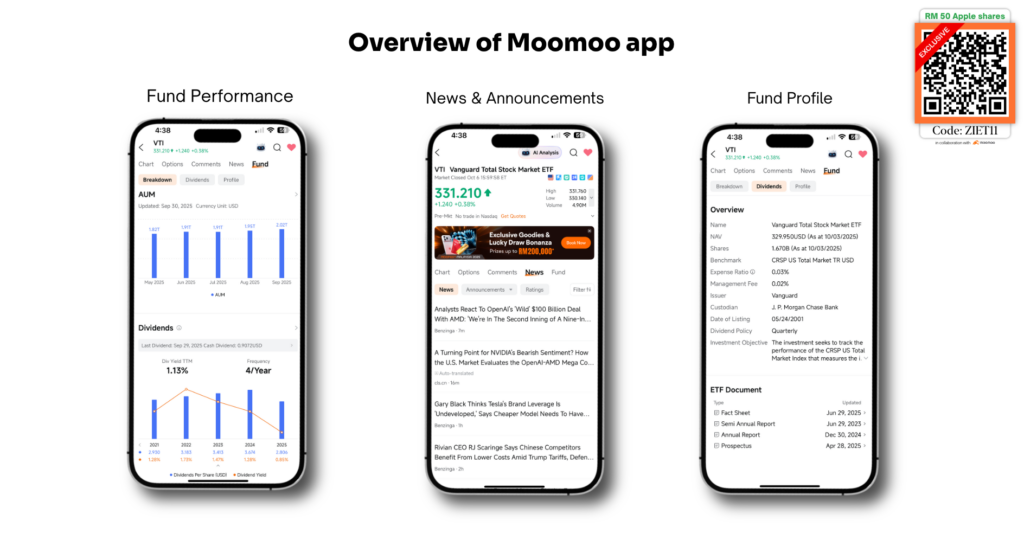
Trading fees (Moomoo Malaysia)
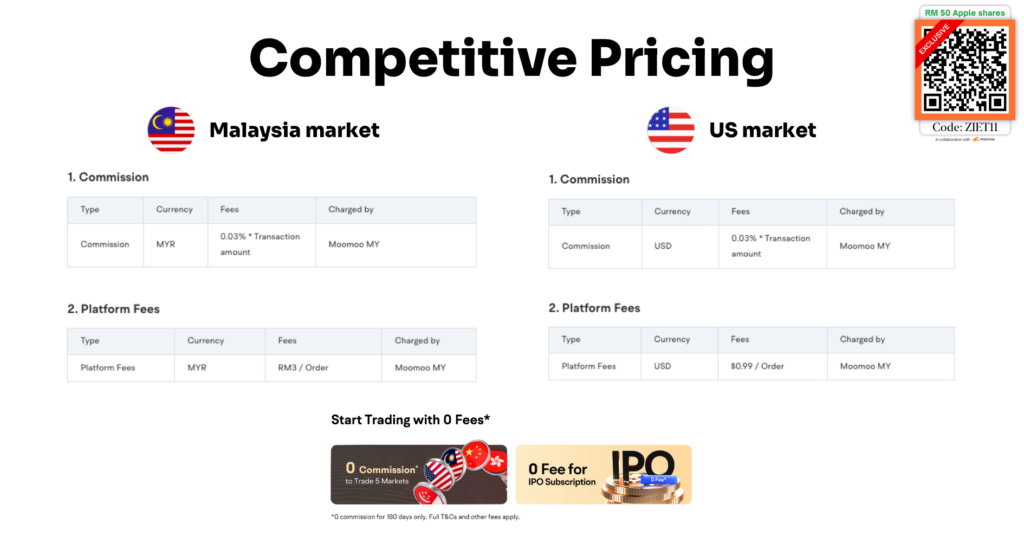
Sign Up Now to Make Your First Trade (Limited time exclusive rewards!)

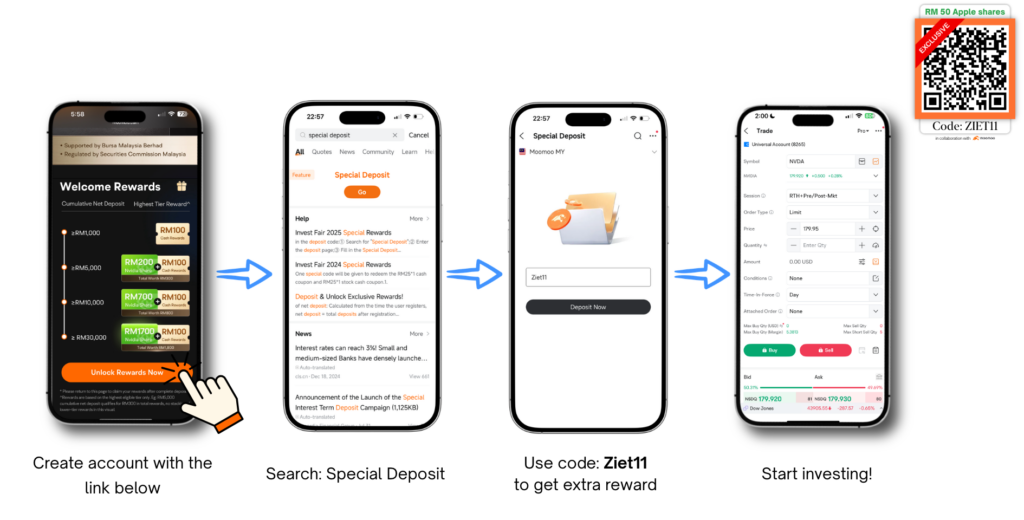
Click here to create an account or use my exclusive code ‘ZIET11’ to unlock all the new users’ rewards!
Final Thought
Buying your first stock is not about trying to get rich quickly. It is about learning how the market works.
Once you understand stocks, shareholding, bid and ask prices, order types, quantity, settlement, and withdrawals, the whole process becomes much less intimidating.
Start small. Learn the mechanics. Make mistakes with small amounts, not your life savings.
And most importantly, remember that buying a stock means buying a piece of a business.
Treat it like ownership, not gambling. That is how you build confidence as an investor.
*T&Cs apply. All views expressed in this blog are the independent opinions of Ziet, which are not shared by Moomoo Securities Malaysia Sdn. Bhd. (“Moomoo MY”). No content shall be considered financial advice or recommendation. Moomoo MY links are included in this post, through which referrals are made and I may receive certain commissions. Please contact Moomoo MY for more information.
Share the Wealth
Found this information useful? Share this post with your friends and family to help them stay informed about what’s happening around them. And if you’re not already subscribed, join our community to receive more insightful content directly to your hands.


