

Estimated reading time: 16 minutes
If you’ve just signed up for Moomoo Malaysia and you’re staring at the app wondering where to even begin, this guide is for you.
Think of this as your end-to-end roadmap, taking you from absolute zero to your very first investment.
Here is a quick breakdown of the steps ahead:
- Strategizing: Choosing the right assets for your risk tolerance and researching companies.
- Executing: Placing your first trade, tracking your portfolio, and selling.
- Cashing out: Exactly how to withdraw your funds when the time comes.
And before we dive in, this blog will use Moomoo as the tutorial app. If you haven’t signed up yet, use my link here and enter code ZIET11 to unlock exclusive rewards.
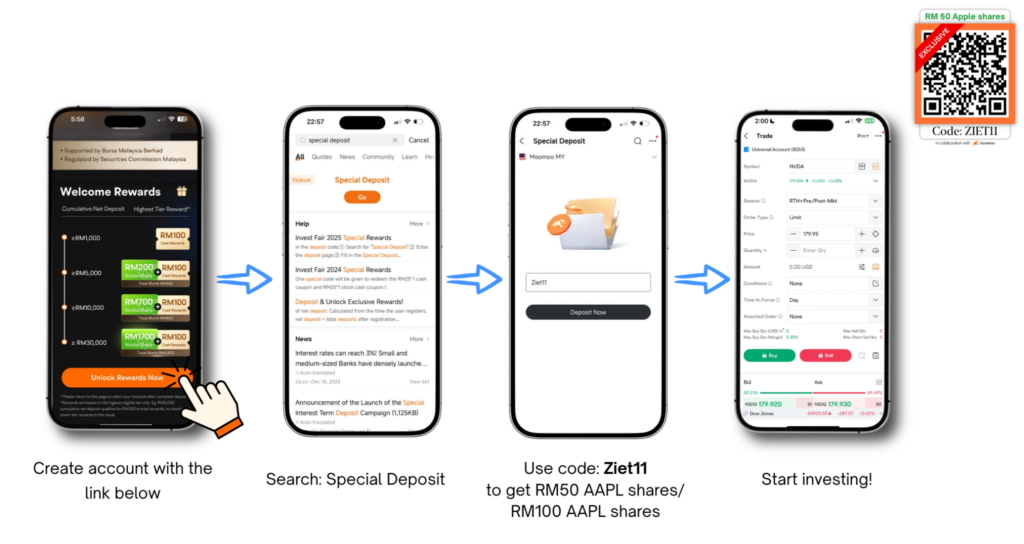
TABLE OF CONTENTS
Choosing What to Invest In (Risk vs Reward)
Before you jump into stocks, take a step back and ask yourself three things:
- Time horizon: Are you investing for 2-3 years, or for the long run (5 to 10 years)?
- Risk appetite: How much volatility (price going up and down) can you handle without panicking?
- Investment goal: Do you want your money to grow over time, or do you need regular passive income from dividends?
Your answers will naturally point you toward the right type of investment.
The general rule is simple: higher risk, higher potential reward, and vice versa. Here’s a rough framework based on three levels of risk tolerance:
| Risk Level | Asset Types | PIDM Protected | Historical Return (p.a., last 10 years)* |
| Conservative | Cash Savings | Yes | 0.5% – 1.5% |
| Fixed Deposit | Yes | 2% – 4% | |
| EPF | No | 5% – 6.5% | |
| Money Market Fund | No | 2% – 5% | |
| Bond | No | 3% – 5% | |
| Moderate | ETF (S&P 500 / Nasdaq-100) | No | 6% – 20% |
| REIT | No | 4% – 8% | |
| US Blue Chip Stocks | No | 5% – 30% | |
| Property | No | 5% – 10% | |
| Aggressive | IPO | No | 10% – 50% |
| Options | No | 20%+ (or significant loss) | |
| Crypto (Bitcoin / Ethereum) | No | 60%+ (highly volatile) |
Past performance is not a guarantee of future results. Sources: RinggitPlus, EPF, BNM, Vanguard, StateStreet, iProperty, Curvo.
Yes, some of those higher-end numbers look very attractive. But it’s just as important to understand that they can go the other way too. Nothing is guaranteed here.
One practical way to reduce risk is through diversification, which means spreading your money across different asset types, sectors, or markets so you’re not putting all your eggs in one basket. The right mix will depend on your risk tolerance.
Top Down Analysis: Country → Sector → Asset
When it comes to researching where to invest, most experienced investors use what’s called a Top Down Analysis. You start big, then zoom in: country first, then sector, then individual stock.
Step 1: Country (Macro Level)
Start by identifying which country has a good investment climate. You generally want to look for economies that support free trade, have stable monetary policies, and are attracting investment in high-growth industries like tech.
Some useful indicators:
- GDP (Gross Domestic Product): Measures how fast an economy is growing. An upward trend is a positive sign.
- Political climate: Political instability is bad for markets because it introduces unpredictable policy risk. Look for markets with minimal drama.
- Currency strength: If the local currency weakens against the Ringgit, your investment might look good on paper but lose value once converted back.
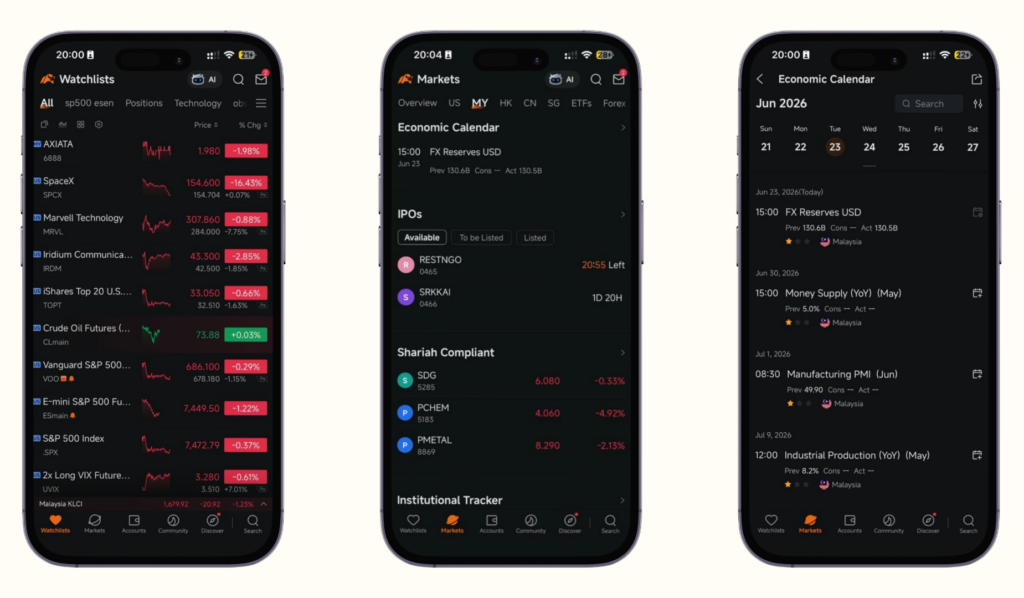
You can find economic data like GDP, CPI, imports and exports directly on the Moomoo app: go to Market → MY → Economic Calendar.
Step 2: Sector
Once you’ve picked a market, compare the different industries within it. You’re looking for the sector that drives the most economic activity. For Malaysia, that might be banking. For the US, it’s typically tech.
On the Moomoo app: Market → MY → Heat Map. Larger squares = bigger sectors. Green = trending up for the day. Red = trending down.
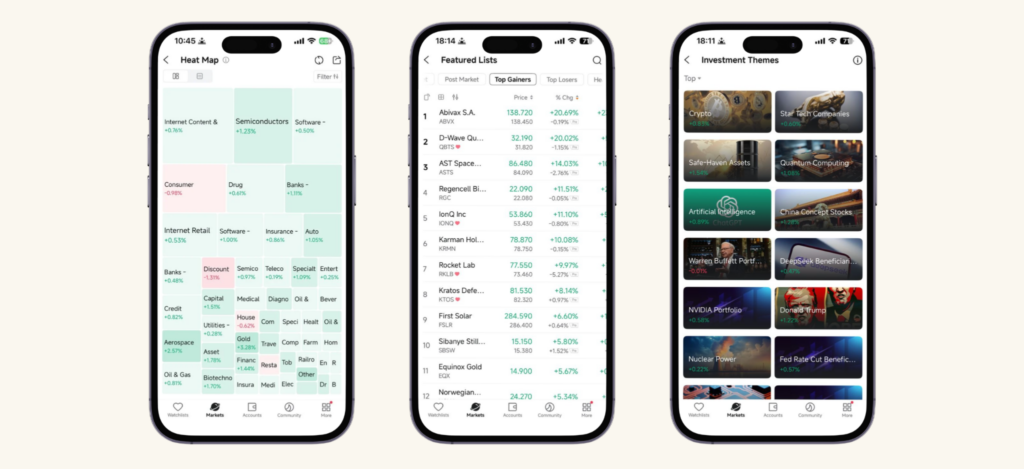
You can also check Investment Themes for hot sectors, or browse Featured Lists for stock ideas.
Step 3: Stock
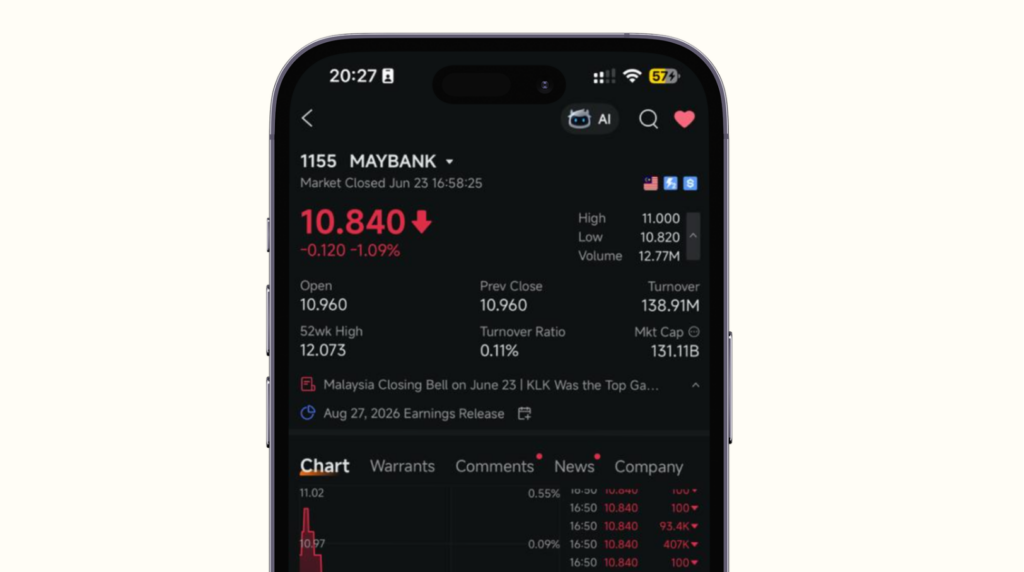
Once you’ve narrowed down to a sector, pick a company you understand or have conviction in. For this guide, we’ll use Maybank as an example, one of the largest banks in Malaysia. But the same process applies to any stock, whether it’s on Bursa Malaysia or the US market.
Fundamental Analysis: Tabs You Need to Know
This is the part where you actually study the company. It sounds intimidating but Moomoo makes it very accessible. Most of the data is already calculated for you.
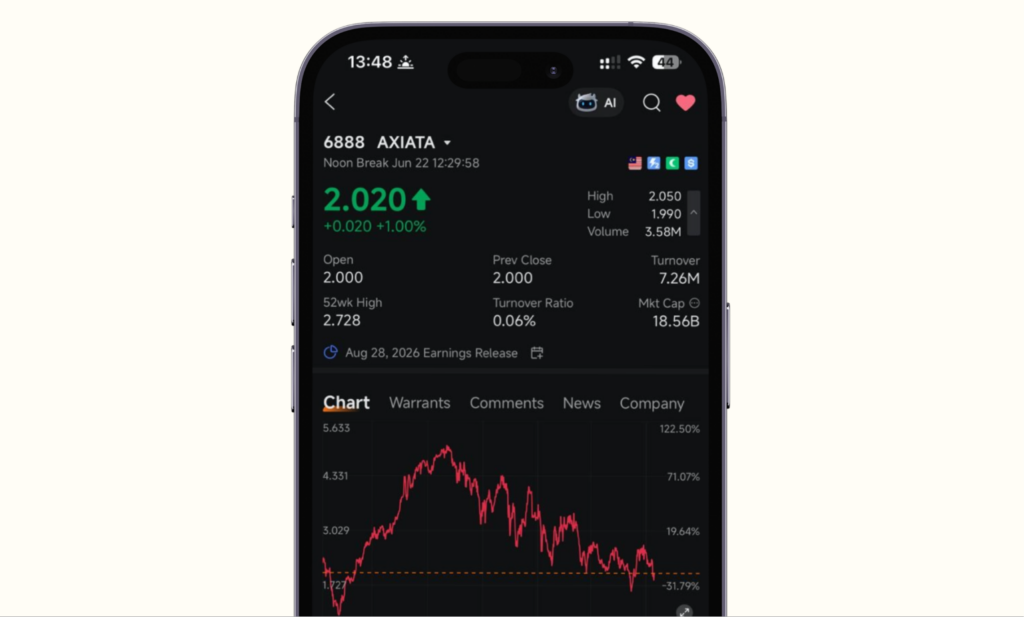
Tab 1: Chart
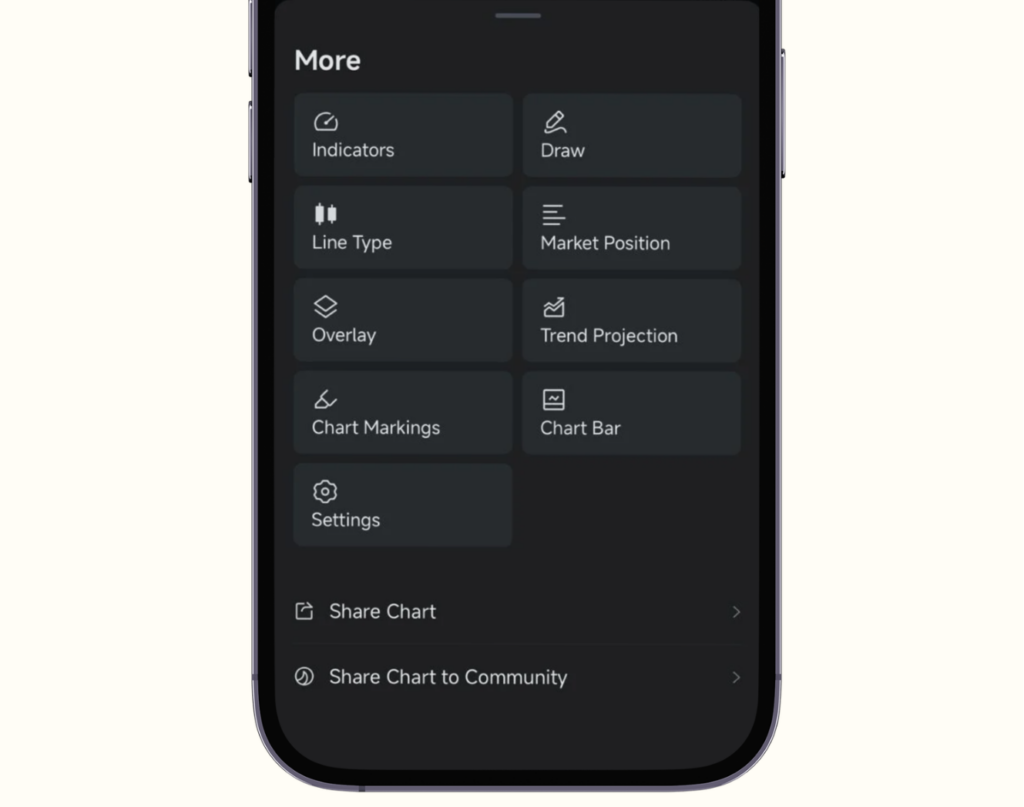
The chart shows price movement over different time periods, from 1 day all the way to the full history since IPO. These charts help you visualise price trends, support levels, and resistance levels. Useful for active traders, though less critical for long-term investors.
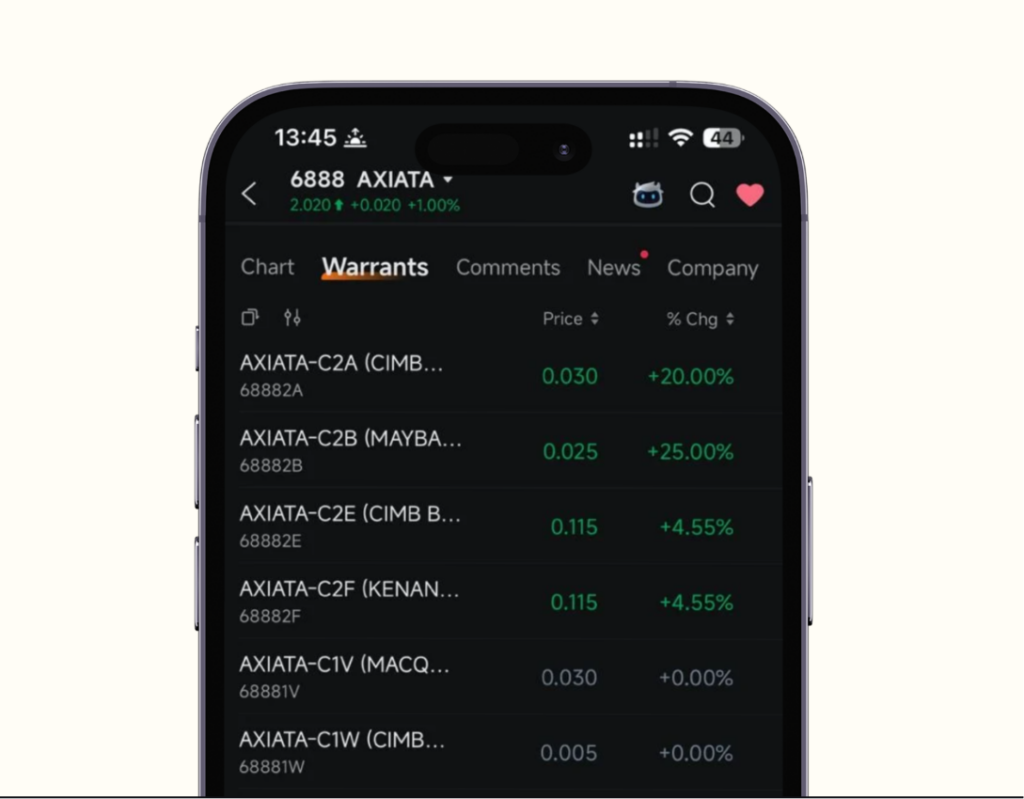
Tab 2: Warrants
Think of a warrant like an option. It’s issued by the company itself, and you can buy it just like a regular stock.
Once you hold a warrant, you have the right to subscribe for new ordinary shares at a fixed price (called the strike price) within a set period (the expiry date). If the market moves in your favour and buying via the warrant is cheaper than buying from the open market, you exercise it. If not, you simply let it expire without doing anything – no obligation.
For example, if a warrant has a strike price of RM 8.00 but the stock is trading at RM 7.50, there’s no reason to exercise. You’d just let it go. But if the stock rises to RM 9.00, that same warrant suddenly looks attractive.
That said, warrants add a layer of complexity that isn’t necessary when you’re just getting started. Stick with regular stocks and ETFs first, and revisit warrants once you’re more comfortable with how markets move.
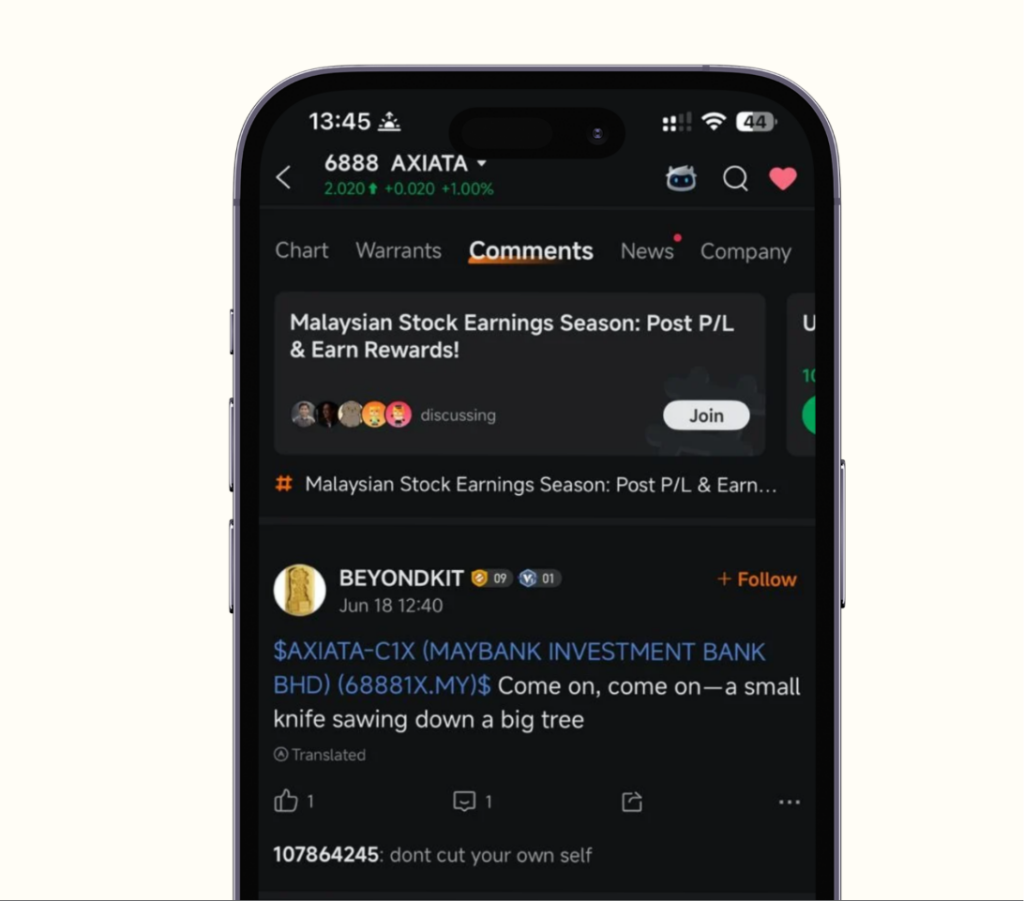
Tab 3: Comments
The Comments section shows what other Moomoo users are saying about the stock. Sometimes you’ll find sharp insights, sometimes completely the opposite view to yours, which is actually valuable. It’s a good way to pressure-test your own thesis and check if your view might be biased.
Tab 4: News
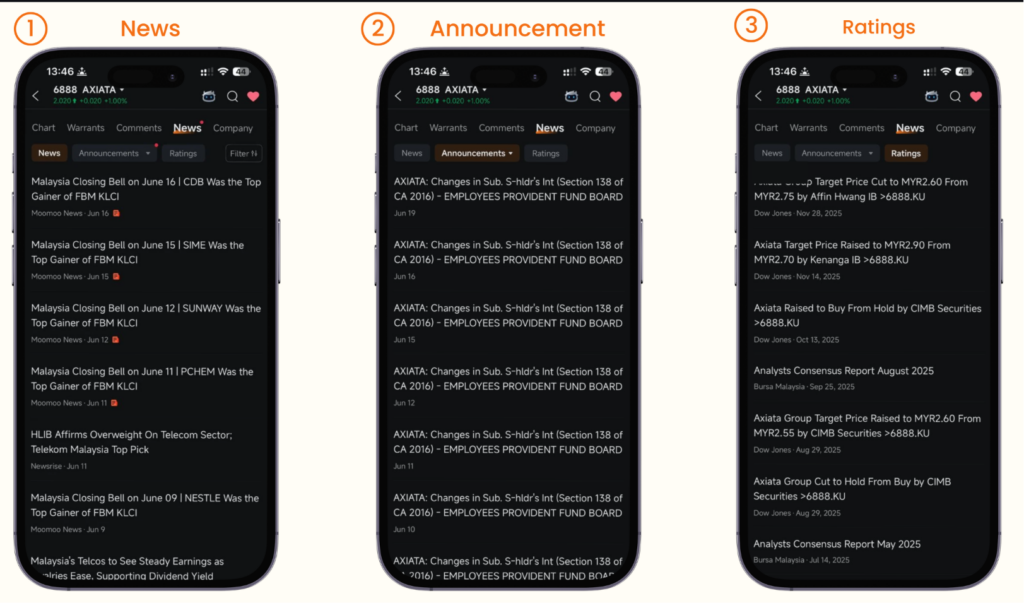
All relevant news for the stock is aggregated here, from Moomoo’s own team plus sources like The Edge Markets, Business Today, and Bernama. There’s also an Announcements tab for official company releases and a Ratings tab for analyst recommendations. Just remember to read these critically, not blindly.
Tab 5: Company (Financials)
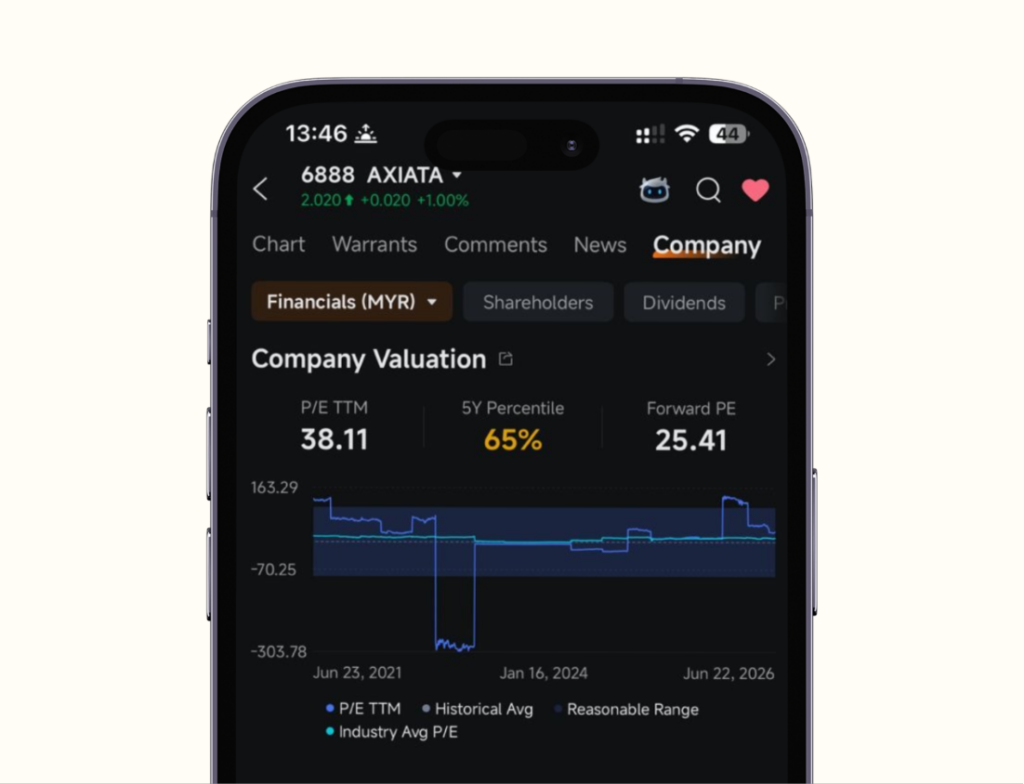
This is where the real due diligence happens. The Company tab pulls together everything you need for quantitative analysis: Revenue Estimates, Analyst Ratings, Company Valuation, Key Financials, Revenue Breakdown, and more.
- Under Company Valuation, you’ll find:
P/E (Price-to-Earnings): Compares the stock’s price to how much the company earns per share.
- High P/E: investors expect strong future growth, or the stock may be overpriced
- Low P/E: could be a bargain, or could reflect a struggling business
- Always compare against the industry average, not in isolation
P/B (Price-to-Book): Compares the stock price to the company’s net asset value (what it would be worth if you liquidated everything and paid off all debts).
- P/B below 1: you’re buying the company for less than its book value, which can signal an undervalued stock
- Commonly used to evaluate banks and financial companies
P/S (Price-to-Sales): Compares the stock price to the company’s total revenue.
- Most useful for companies that aren’t yet profitable, where P/E isn’t applicable
- Lower P/S generally means the stock is cheaper relative to the revenue it generates
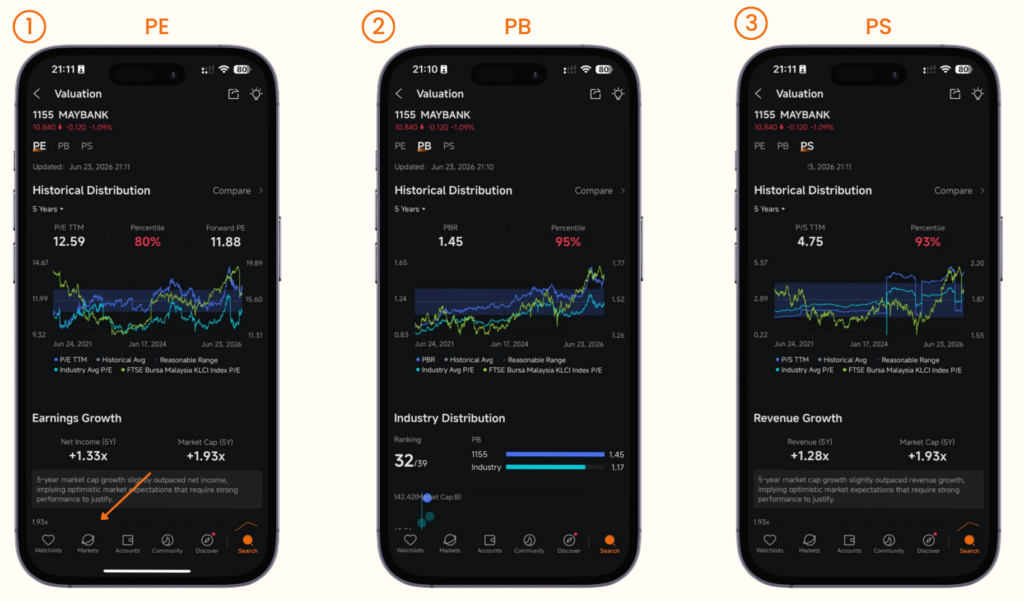
These ratios help you compare the stock against its industry average or a specific competitor. You can even add a competing company directly in the app via the Compare function.
Under Key Financials, you’ll find metrics like Net Profit Margin, Earnings Per Share (EPS), and the full financial report. Moomoo also breaks down revenue by business segment and by market geography.
The three core financial statements (Income Statement, Balance Sheet, and Cash Flow) are also accessible here.
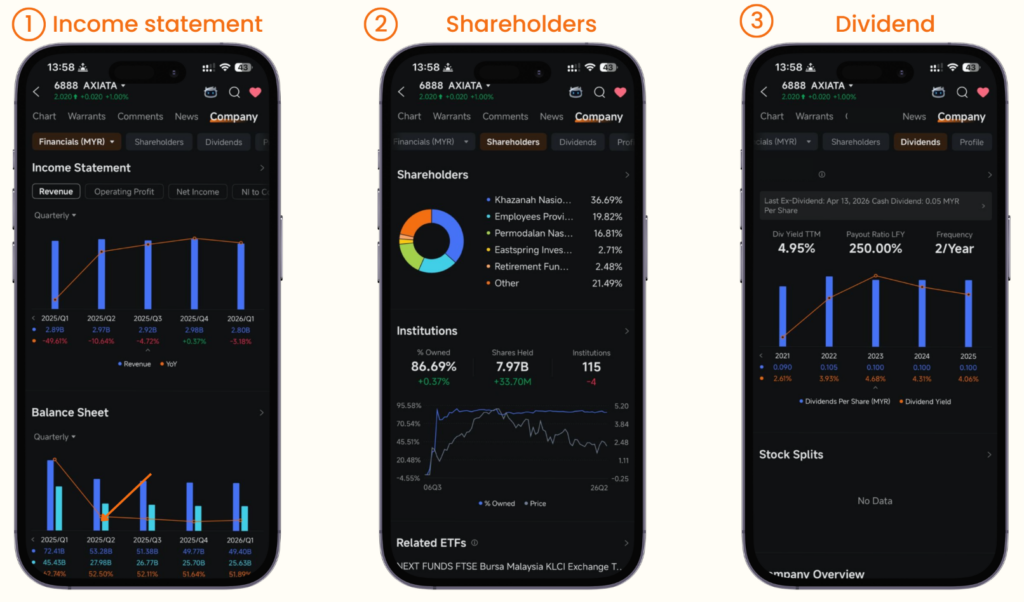
Don’t forget to check Major Shareholders. If institutions like EPF (the government pension fund) are holding a significant portion of a company’s shares, that tells you something about the quality of the business. Big, careful institutional money doesn’t go just anywhere.
Finally, scroll down to Dividends to see the payout history, dividend per share, ex-dividend date, and payment date. If you buy a stock before the ex-dividend date, you qualify for the upcoming payout.
Setting Up Your Watchlist
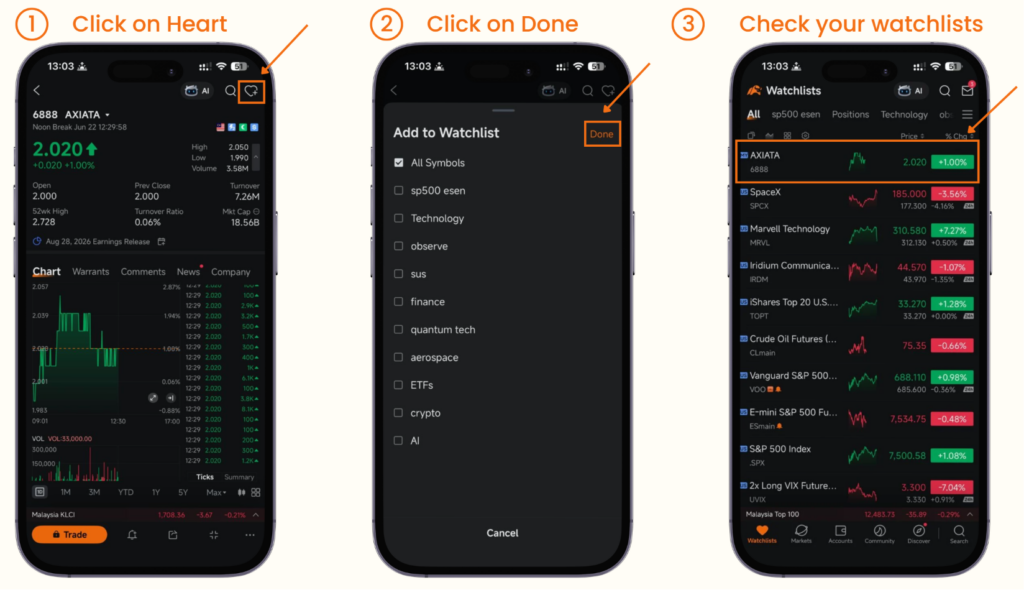
Found a stock you’re interested in but not ready to buy yet? Add it to your watchlist.
Search for the stock, open it, and tap the heart icon at the top of the page. That’s it. You can then access your full watchlist from the bottom-left of the app. You can also organise your watchlist into custom categories, grouping by sector or market, for example.
How to Buy a Stock on Moomoo
This is the fun part.
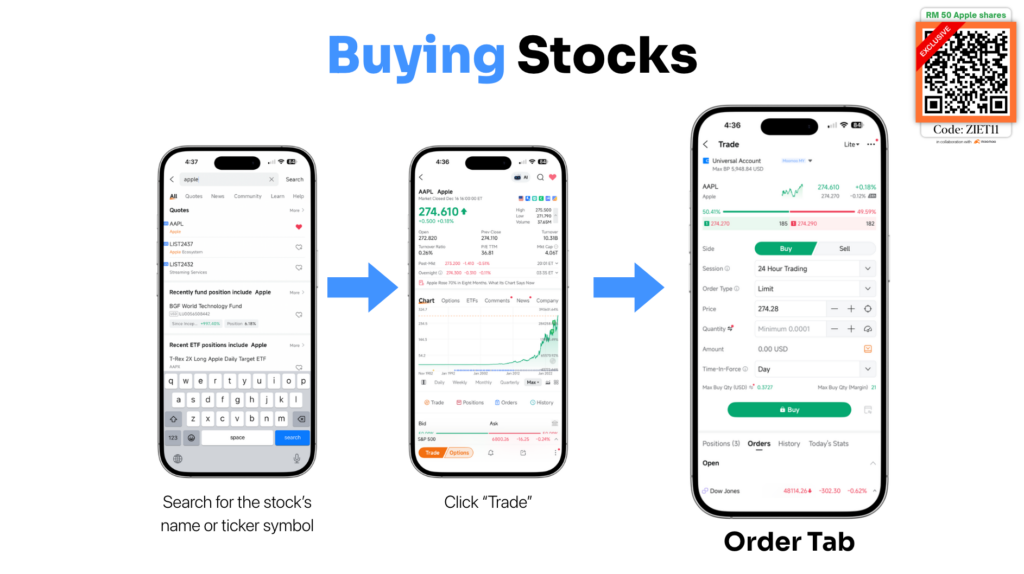
Search for your stock (or find it in your watchlist), tap Trade, and you’ll see the order screen.
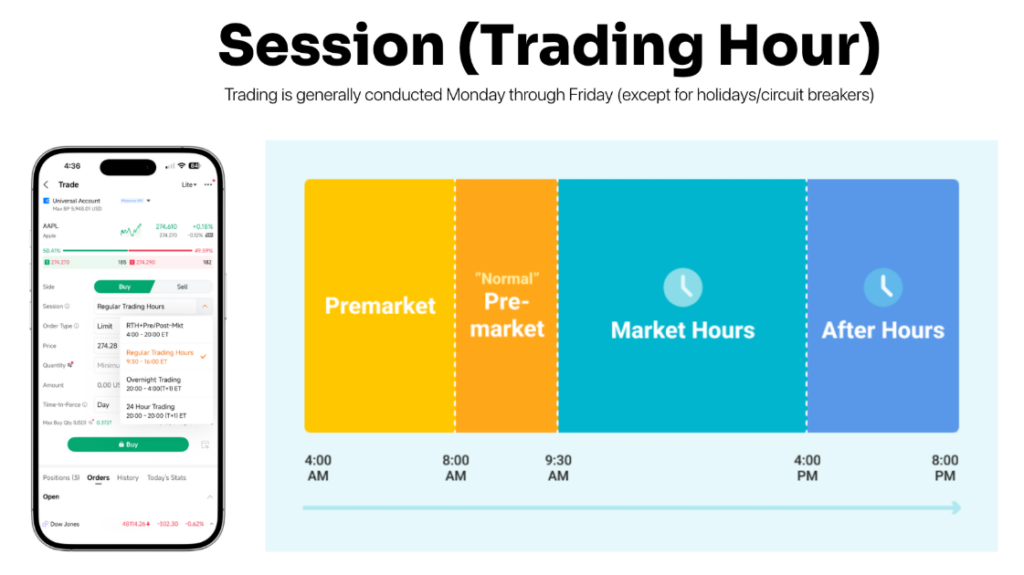
Quick note on trading hours:
| Market | Regular Hours |
| US Stocks | 9:30 AM – 4:00 PM Eastern Time (also supports 24/5 trading) |
| Malaysia Stocks | 9:00 AM -12:30 PM, 2:30 PM -5:00 PM MYT |
| Singapore Stocks | 9:00 AM -12:00 PM, 1:00 PM -5:00 PM SGT |
| Hong Kong Stocks | 9:30 AM -12:00 PM, 1:00 PM -4:00 PM Beijing Time |
| China A-Shares | 9:30 AM -11:30 AM, 1:00 PM -3:00 PM Beijing Time |
For US stocks specifically, Moomoo supports 24-hour trading on weekdays, which is handy if you want to place a trade outside regular market hours.
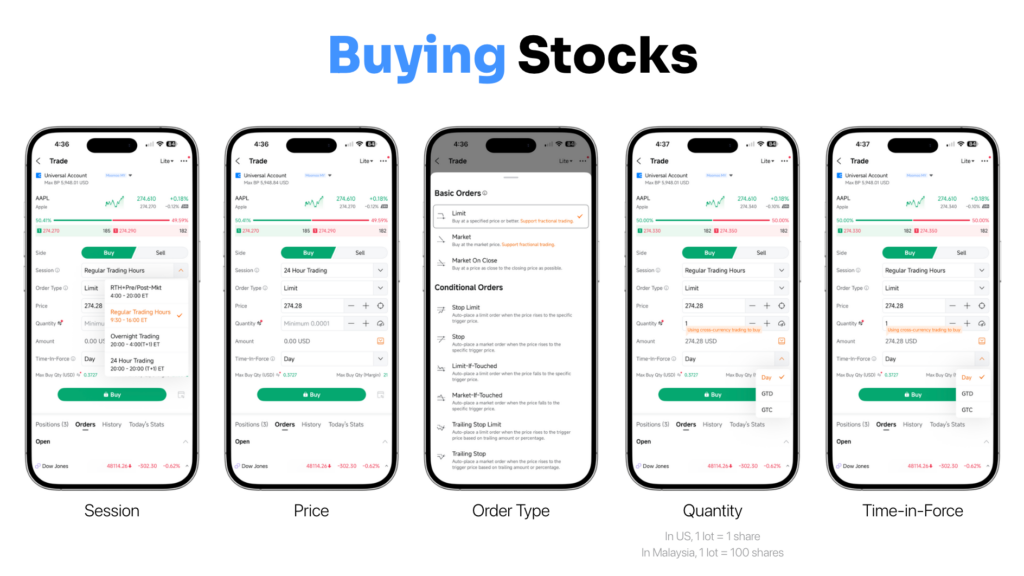
Order types to know:
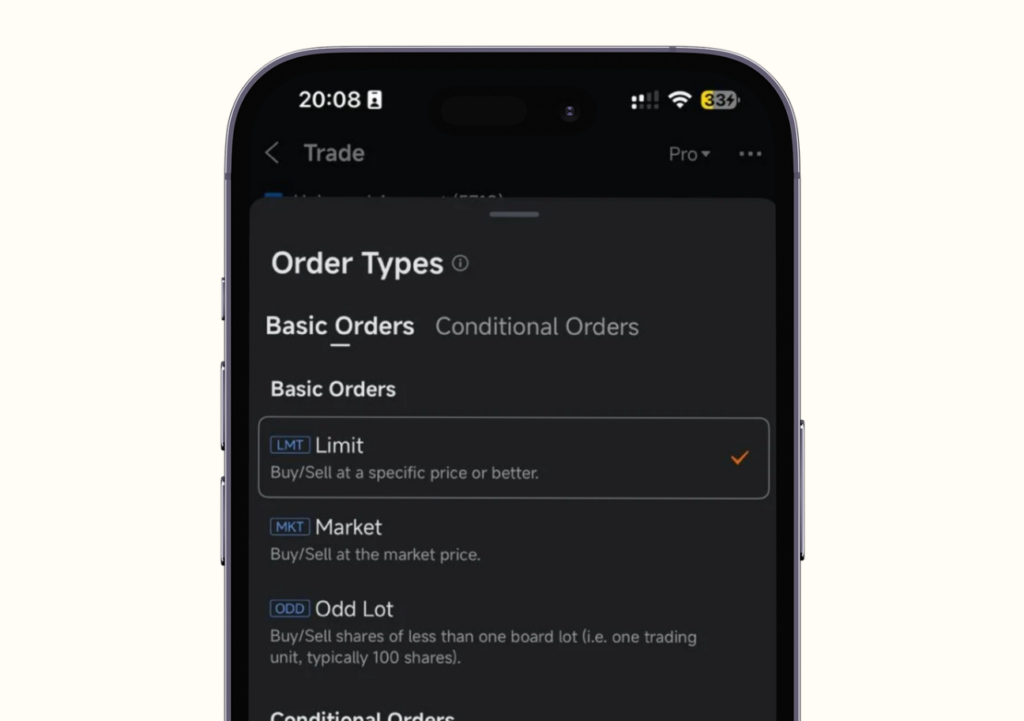
- Limit Order (default): You set the price you want to buy at. The trade only goes through when the stock hits that price.
- Market Order: Buy immediately at the current market price.
- Odd Lot: Useful if you want fewer than 100 shares (the standard lot size on Bursa Malaysia). For US stocks, you can buy as little as 1 share or even a fraction of a share.
Time in Force:
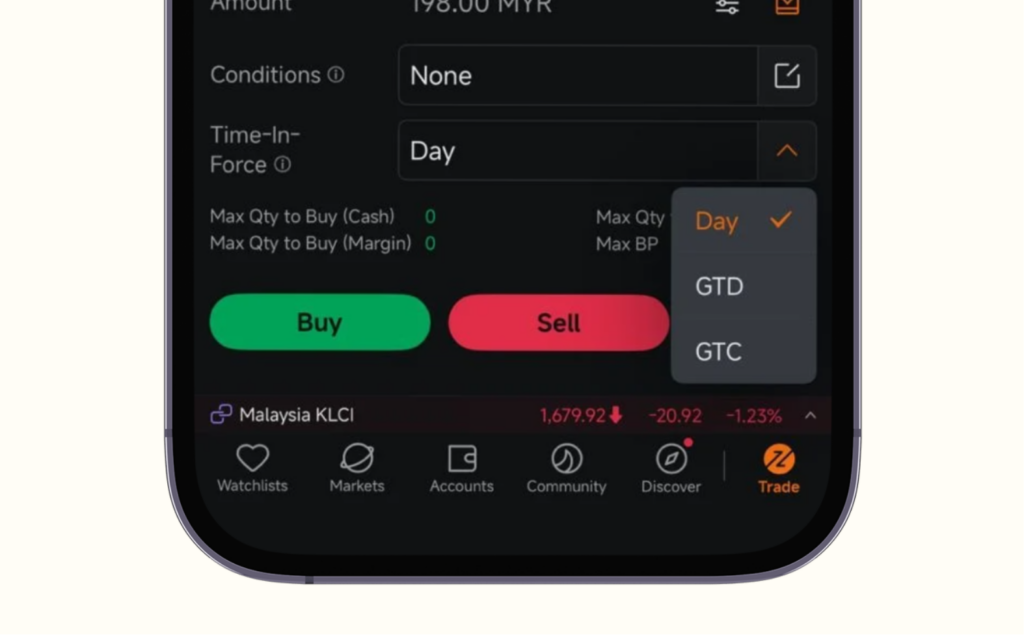
- Day: Order expires at the end of today’s trading session.
- GTD (Good Till Date): Order stays open until a date you specify.
- GTC (Good Till Cancelled): Order stays open for up to 90 days.
Once you’ve set your order type, price, and quantity, tap Buy. You’ll receive a notification once the order is fulfilled. You can check your positions under Portfolio and see the order status under the Orders tab. If you want to learn more we have covered that in a different blog.
Monitoring Your Portfolio
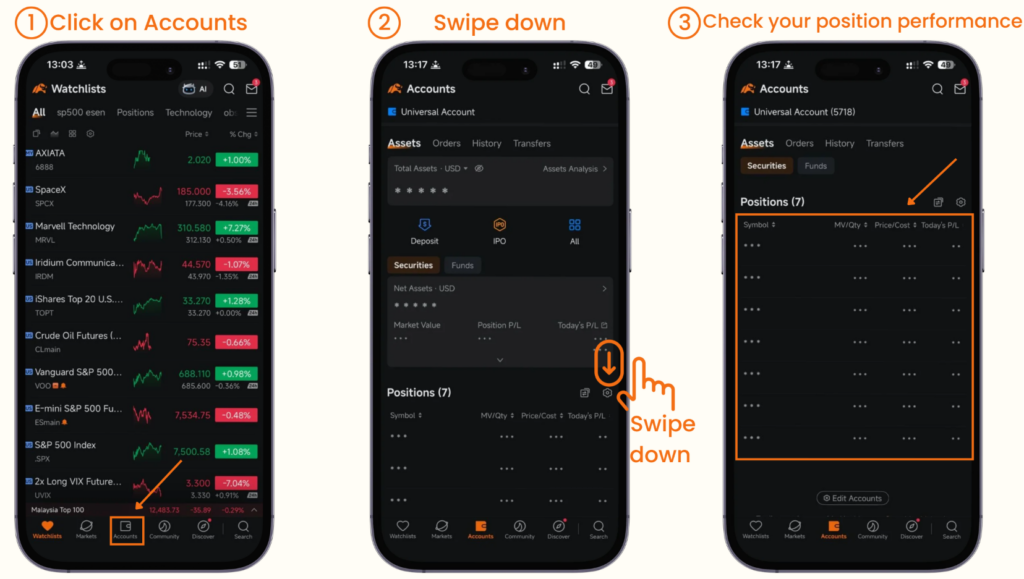
After buying, go to Account → Assets to see your full portfolio. Under Positions, you’ll find each stock, its current market value, your average buying price, and your unrealised profit or loss.
It’s completely normal to feel anxious when prices drop. But investing is a long-term game. Short-term movements are noise. What matters is the longer-term trajectory.
Here’s something worth looking at: pull up a stock’s 1D or 6M chart and it might look all red. But zoom out to 1Y or 5Y, and a fundamentally sound company will almost always show a different picture.
Check your portfolio occasionally. But don’t let daily price movements consume your mental bandwidth.
How to Sell a Stock
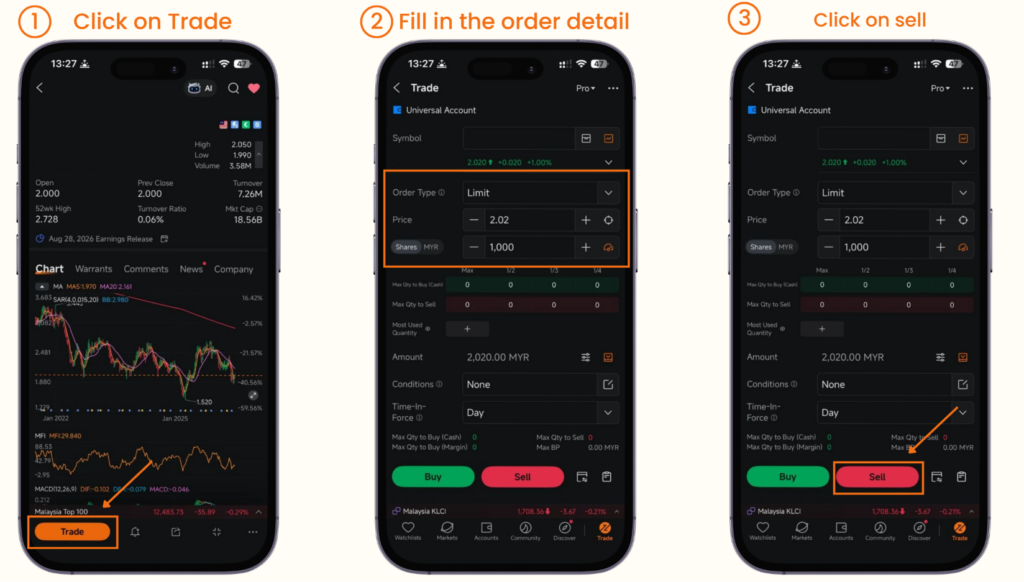
Go to Account → Assets → Positions, select the stock you want to sell, and tap Trade. Choose your order type (Limit or Market), enter how many shares you want to sell, and hit Sell.
If you want to automatically protect yourself from large losses, you can use Stop Limit orders:
- Set a Trigger Price (the price at which the order activates).
- Set a Sell Price (the minimum price you’re willing to accept).
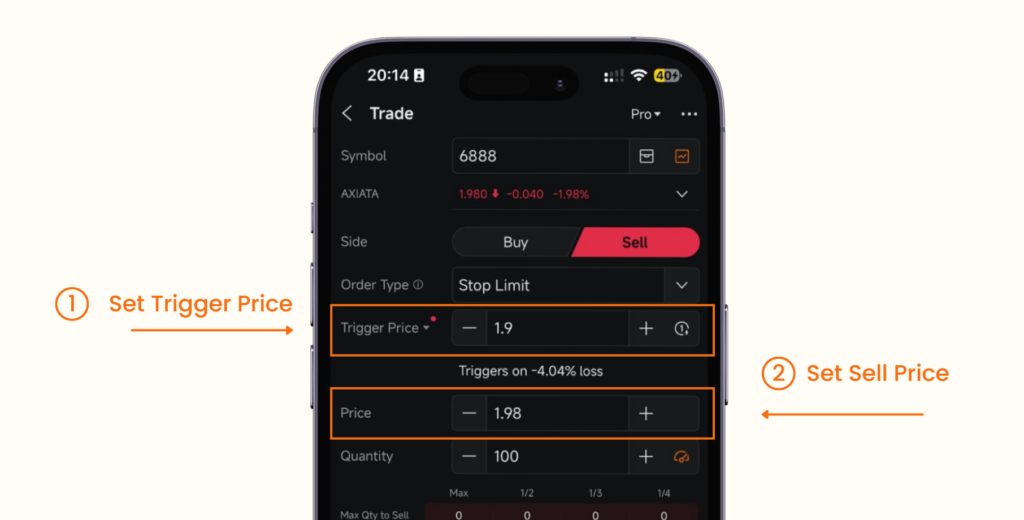
For example: Apple is at USD 200. You’re okay cutting losses if it falls to USD 180. Set trigger at USD 190, limit at USD 180. If the stock drops to USD 190, Moomoo will try to sell it between USD 180 and USD 190.
On the flip side, if you want to lock in a profit target, use a Limit-If-Touched order. Same concept, but for taking profit instead of limiting loss.
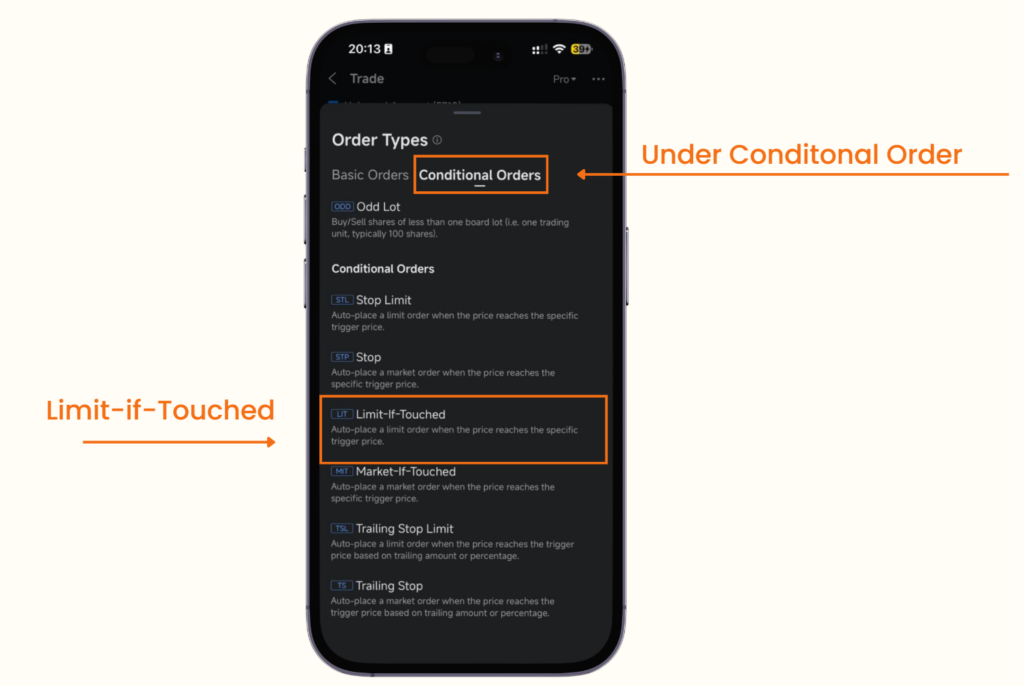
That said, for most investors, a Limit or Market order is more than enough.
One important note on settlement: after selling, the cash doesn’t become available for withdrawal immediately.
- Malaysia: T+2 (two trading days to settle)
- US: T+1 (one trading day to settle)
How to Withdraw Your Money
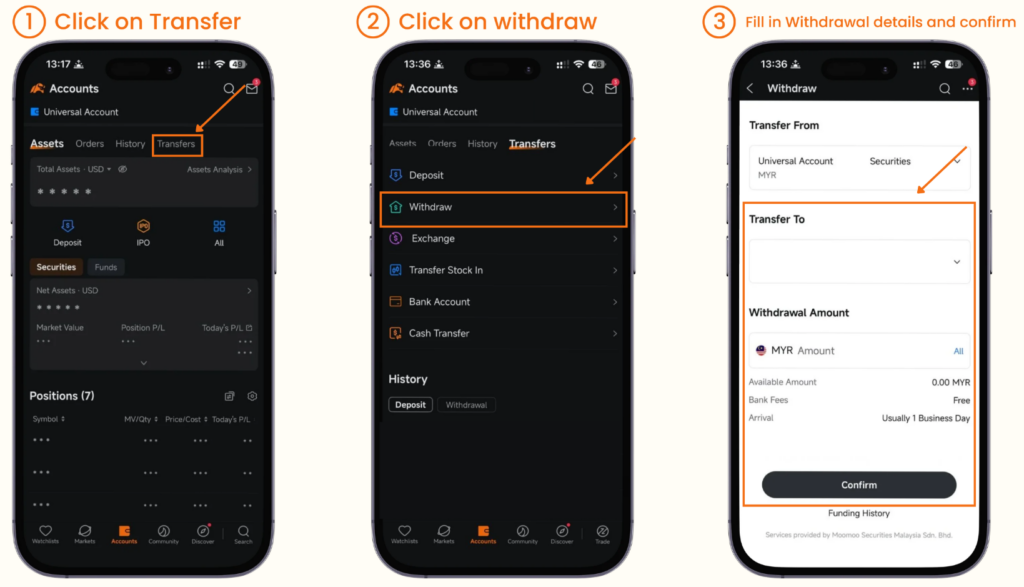
Head to Account → Transfers → Withdraw. Enter your bank details and follow the steps. Money typically reflects in your bank account within 1 to 3 business days.
Final Thought
That’s the full picture, from funding your account to cashing out your returns.
Investing doesn’t need to be complicated. But it does require you to be intentional: understand what you’re buying, know your risk tolerance, and have a plan for the long run.
If you’re just getting started and want exclusive rewards on Moomoo, sign up using my link below and deposit with code ZIET11.
If you prefer a video version of this article, I have made a video covering the exact same thing -do check it out here! Thanks for reading!
*T&Cs apply. All views expressed in this blog are the independent opinions of Ziet, which are not shared by Moomoo Securities Malaysia Sdn. Bhd. (“Moomoo MY”). No content shall be considered financial advice or recommendation. Moomoo MY links are included in this post, through which referrals are made and I may receive certain commissions. Please contact Moomoo MY for more information.
Share the Wealth
Found this information useful? Share this post with your friends and family to help them stay informed about what’s happening around them. And if you’re not already subscribed, join our community to receive more insightful content directly to your hands.


